

If you've been using iPhones as long as I have, you know there's always something new to discover. It might be a hidden gesture that simplifies your day or a security setting you hadn't considered. I've compiled some iPhone secrets and handy tips that have proven invaluable to me over the years, and I'm sure you'll find them useful too. Let me take you on a tour of the less-explored corners of our favorite device.
The Power of Settings: Get to Know Your iPhone in Depth
1. Battery Adjustment: Stretching Life to the Maximum

One of the most common frustrations, even with models like the used iPhone 12 Pro or the iPhone 17 Pro , is battery life. I've learned that understanding your battery settings is crucial.
- Low Power Mode : Easily activated from the control center. This mode disables background updates and email downloads, perfect for extending battery life during the last few hours of use.
- Battery health : Go to Settings > Battery > Battery health. This gives you a clear idea of how much battery life your phone has left.
In my experience, taking a few minutes to review these settings every now and then can significantly improve your iPhone's daily performance.
2. The Magic of Face ID and Touch ID

Both features have been a blessing in terms of security and ease of use. As someone who has gone from the iPhone 5s to the refurbished iPhone 16 Pro , I've had my share of good and bad experiences.
- Face ID : It's not just for unlocking. I use it to authenticate payments and access banking apps. Plus, with iOS 17, Face ID is even faster at recognizing your face, even with a new look.
- Touch ID : Although Face ID now dominates, in previous models like the Refurbished (CPO) iPhone 12 , Touch ID remains a benchmark for convenience and security.
3. Privacy and Security Settings
Keeping our information private is crucial. Apple has done an excellent job in this area.
- Location Services : Although apps request permissions, regularly review which apps have access to your location. I prefer "While using the app" over "Always."
- Two-factor authentication : It's essential. It's saved me more than once from unauthorized access attempts.
Mastering Everyday Use
4. Shortcuts and Automation: Less Work, More Results
The iPhone ecosystem is powerful, and many underestimate the power of shortcuts. Did you know you can create a shortcut to send predefined messages with a simple tap?
- Shortcuts app : Here you can automate daily tasks and save time. My favorite shortcut is one that automatically sets "Do Not Disturb" mode when I open my meditation app.
5. Dark Mode: More than just aesthetics, a break for your eyes
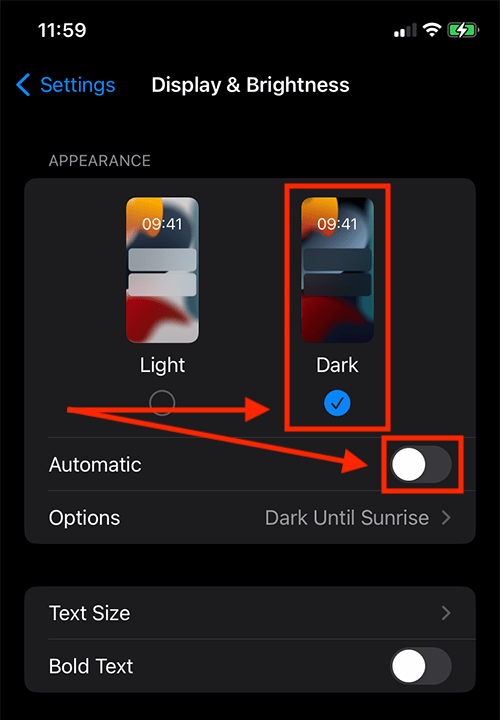
Using dark mode not only extends your battery life on devices with OLED screens, like the Refurbished iPhone 14 , but it also reduces eye strain, something I've especially noticed when reading at night.
Keeping your iPhone Like New
6. Regular Cleaning: A Sparkling iPhone
Over time, we accumulate more unnecessary data and files than we could ever imagine. On my old iPhone 6, this was a constant headache.
- Delete Unused Apps : With the unused apps download mode, the iPhone takes care of it without losing your associated data.
- Organize your photos : Use iCloud to hide duplicate photos. You'll save space and your gallery will look tidier.
We've reached the end...
So far, I've only covered some of the iPhone secrets and tips that have helped me the most over the years. What other tips have you discovered in your experience as an iPhone user? I'd love to read about them in the comments. Remember, there's always a new corner to explore in the entire iPhone collection .
May your iPhone journey continue to bring you pleasant surprises!
Visit the website for more details and discover fantastic products for your iPhone at gsmpro.com .